Overview
I audited the portfolio you are reading, fixed what I found without removing the playful interactions, and left every change inspectable.
The animations were never the problem. For many visitors, they were the only way in.
Try it
Two tools run on every page of this site. Neither is a plug-in or an overlay; both are ordinary HTML, CSS and JavaScript you can read.
The X-ray button sits next to A11y in the top right corner of every page.
The audit
What I found in my own site
issues in the original build, across the home page, both case studies, the testimonials and the panels
of them serious: they stopped some people doing something, rather than just making it harder
were flagged by an automated scanner (axe-core). The other 13 came from keyboard testing, measurement and emulation
- Measured: axe-core 4.10 against WCAG 2.2 AA on every page and panel, with contrast calculated from the colours the browser actually painted.
- Walked: keyboard only, then reduced motion, forced colours, a 320px viewport and the WCAG 1.4.12 text-spacing values.
- Re-run: every fix was checked again against the test that caught it.
Design
Equal path, not a lesser one
My rule was that no interaction gets removed. Each keeps its delight and gains an equal route, and the accessible route is the default, not a hidden mode.
| Interaction | What it does | Equal path |
|---|---|---|
| Ring cursor | A ring trails the pointer and swells over links. | It wraps the real pointer instead of replacing it. Off for touch, reduced motion, forced colours, or “Pointer only”. |
| Flip, then expand | A card flips and its colour grows into the next page. | Cards are real links, so Enter, middle-click and open-in-new-tab all work. Under reduced motion it just navigates. |
| Photo and hat reveals | Hovering the About card brings in my photo and a hat per role. | The same state on keyboard focus, with the hats cycling by themselves and Esc to dismiss. Static under reduced motion. |
| Typing bubbles | Small decorative hover scenes. | Hidden from assistive technology. Nothing important lives only here. |
| Full-screen panels | About and Contact open over the home page. | Native dialogs: focus moves in, the page behind is inert, Esc and Back close it, and #about is a shareable address. |
| Colour-coded tiles | Each section has its own accent colour. | Meaning also lives in headings and text. Text colours pass 4.5:1, and High contrast mode goes further. |
Preferences, not an overlay
The site has to be accessible without anyone touching a setting. The A11y panel only adds comfort, starting from your device settings for motion and contrast. Nothing is injected from a third party, and nothing is claimed on the page’s behalf.
| Control | Criterion | Level | How it’s met |
|---|---|---|---|
| Text size | 1.4.4 Resize Text | AA | Large and Larger set the root size to 125% and 150%, and every size on the site is in rem, so all text scales without clipping or sideways scrolling. |
| Spacing | 1.4.12 Text Spacing | AA | The layout holds at the 1.4.12 line, letter, word and paragraph values, and Roomy adds extra spacing for anyone who wants it without a browser extension. |
| Contrast | 1.4.6 Contrast (Enhanced) | AAA | High swaps tinted backgrounds for white, darkens the text colours, thickens borders and underlines every link, aiming for the 7:1 enhanced ratio. |
| Motion | 2.3.3 Animation from Interactions | AAA | Reduce turns off flips, reveals and transitions, and Auto follows the device’s reduced-motion setting. |
Evidence
17 fixes, by X-ray layer
Each fix opens in the X-ray on the live page, with the real code and its before and after.
Landmarks · 1
Shown as markers in the X-ray.
- No landmarks and no skip linkModerate
Every page now has header, main and footer landmarks, and a skip link as the first tab stop.
See it in the X-ray: No landmarks and no skip link
Headings · 1
Shown as markers in the X-ray.
- No h1 on the home page, and heading levels that jumpedModerate
One h1 per page, then h2 sections and h3 titles, so the heading outline reads in order.
See it in the X-ray: No h1 on the home page, and heading levels that jumped
Controls · 3
Shown as markers in the X-ray.
- Cards were buttons that behaved like linksSerious
Cards are real links stretched over the tile, so Enter, middle-click and open-in-new-tab all work.
See it in the X-ray: Cards were buttons that behaved like links - A scrollable strip the keyboard couldn’t reachSerious
The screenshot strip is a labelled region that takes focus, so arrow keys can scroll it.
See it in the X-ray: A scrollable strip the keyboard couldn’t reach - Links that open a new tab didn’t say soMinor
Each new-tab link carries a hidden “(opens in a new tab)” so the warning is announced.
See it in the X-ray: Links that open a new tab didn’t say so
Images · 1
Shown as markers in the X-ray.
- Screenshot alt text named the screen instead of describing itModerate
Screenshot alt text now describes what is on the screen, and the caption says what it means.
See it in the X-ray: Screenshot alt text named the screen instead of describing it
Measurements · 2
Shown as markers in the X-ray.
- Text lost contrast to opacitySerious
Text uses deeper ink shades instead of opacity, so it measures 5.3:1 on its tint.
See it in the X-ray: Text lost contrast to opacity - The Back link was 56 × 19 pixelsModerate
The Back link is now at least 44px tall and reads “Back to home”.
See it in the X-ray: The Back link was 56 × 19 pixels
Behaviour · 9
No marker. These change how the site behaves.
- Opening a panel left focus on the page behind itSerious
Panels are native dialogs, so focus moves in and Esc or Back closes them.
View before and after: Opening a panel left focus on the page behind it - The focus ring disappeared on the coloured header bandsSerious
The focus ring is white on coloured bands and navy on paper, three pixels thick.
View before and after: The focus ring disappeared on the coloured header bands - Type was fixed in pixels, so browser text-size settings were ignoredSerious
Every font size is in rem, with nothing under 12px, so browser text settings apply.
View before and after: Type was fixed in pixels, so browser text-size settings were ignored - Reduced motion was only half-honouredSerious
One motion setting now stops every flip, expansion, fade and reveal, in CSS and JavaScript.
View before and after: Reduced motion was only half-honoured - Underlines and accordion icons vanished in Windows High ContrastSerious
In Windows High Contrast, link underlines and accordion icons use real system colours.
View before and after: Underlines and accordion icons vanished in Windows High Contrast - Delight that only a mouse could triggerModerate
Every hover reveal also runs on keyboard focus, and Esc dismisses it.
View before and after: Delight that only a mouse could trigger - The custom cursor replaced the real oneModerate
The ring trails the real pointer and switches off for touch, reduced motion and forced colours.
View before and after: The custom cursor replaced the real one - Card text could be clipped when spacing or size increasedModerate
Cards grow taller with larger text or spacing instead of clipping words.
View before and after: Card text could be clipped when spacing or size increased - The roles table had no row headers or captionMinor
The roles table has a caption and row headers, so each role is announced with its description.
View before and after: The roles table had no row headers or caption
Impact
How it was tested, and what I am claiming
Target: WCAG 2.2 Level AA. Status as of 13 October 2026: automated and scripted checks pass; testing with real assistive technology is still to do, and I will not claim it until it is done.
| Check | Result | Detail |
|---|---|---|
| axe-core 4.10.2 (WCAG 2.0–2.2 A/AA + best practice) | Pass | 0 violations on the home page, About and Playground panels, Nestora, Wisr, Says and this page. |
| Keyboard, dialogs and history | Pass | Scripted walks: cards, panels, Back button, focus return and browser Back behave correctly. |
| 320 px reflow (1.4.10) | Pass | No horizontal overflow on any page. |
| Reduced motion and forced colors | Pass | Emulated; no overflow or script errors. Visual review of forced colors is still manual. |
| Target size (2.5.8) | Pass | Every visible control measured at 24 × 24 px or larger, or is a stretched card link. |
| Screen readers (NVDA, VoiceOver, TalkBack) | Pending | Not yet tested. No conformance claim is made until this is done. |
| Combination | Status |
|---|---|
| NVDA with Firefox (Windows) | Pending |
| VoiceOver with Safari (macOS and iOS) | Pending |
| TalkBack with Chrome (Android) | Pending |
Known gaps
- Screenshots of the Nestora and Wisr prototypes have text alternatives that summarise each screen, not a full transcription of every word on it.
- Fonts load from Google Fonts. If they are blocked, the page falls back to Georgia and system sans-serif, which is readable but not the intended look.
- Prototype screens are images, so their own text does not respond to the text-size preference.
- Hindi, Tamil, Kannada and Telugu text on the Wisr screens has not been checked against screen-reader pronunciation.
- Font coverage for the Indian-language text on Wisr has not been checked.
- Nobody who uses assistive technology every day has tested the site yet, only me and the scanner.
- There are no demo videos yet. Any added to Nestora or Wisr will need captions and a transcript first.
Found a barrier I missed? Please tell me: Kavya.sriram2000@gmail.com.
Certification
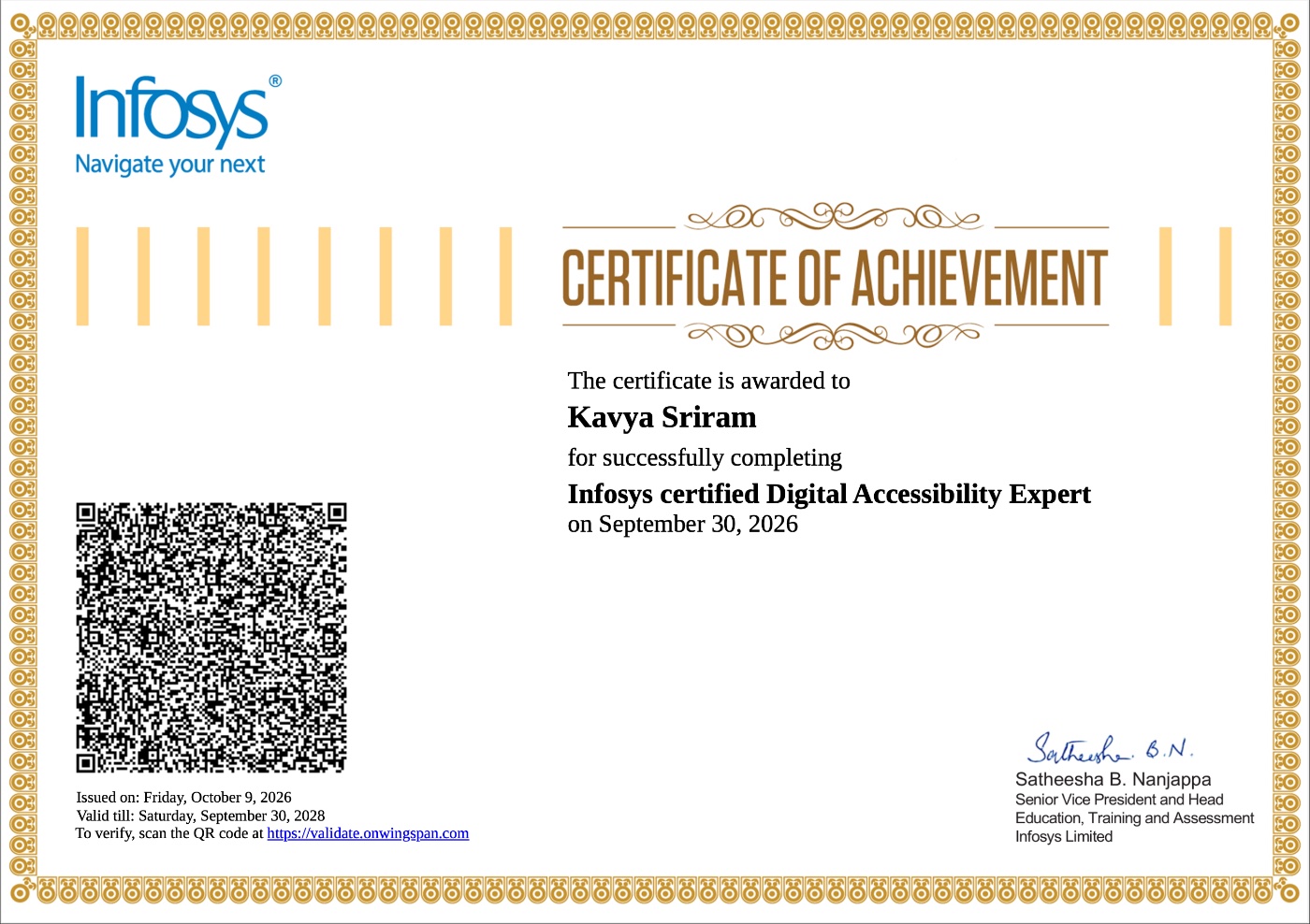
Infosys Certified Digital Accessibility Expert
Everything above is the how. This is the credential behind it.
Reflection
I expected the playful parts to be the casualties, and they mostly survived. What failed was structure: real links, focus management, heading order and colour maths. That is why I would rather catch it in the first wireframe than in the last sprint.